A student's desk: a globe, a Rubik's cube, an open textbook, a ruled notebook, a radio and an alarm clock under an angled lamp.

Work hard,and smart

Demo

Yard is the AI-native work environment for students who try.

One place to do the work

Everything for one assignment on one screen, with Nib, an assistant that can see all of it.

Yard's work page for an AP Biology lab write-up: the assignment from the teacher, a conversation with Nib checking the rates, and the student's readings sheet open alongside.
Your work

A place to work on whatever you want

Your classes and your own projects live on the same page.

The lab due Monday and the project you started on your own get the same threads, the same connected files and the same help, whether the work lives in Docs, Sheets, Notion or FigJam. Nobody at school sees the projects you start yourself.
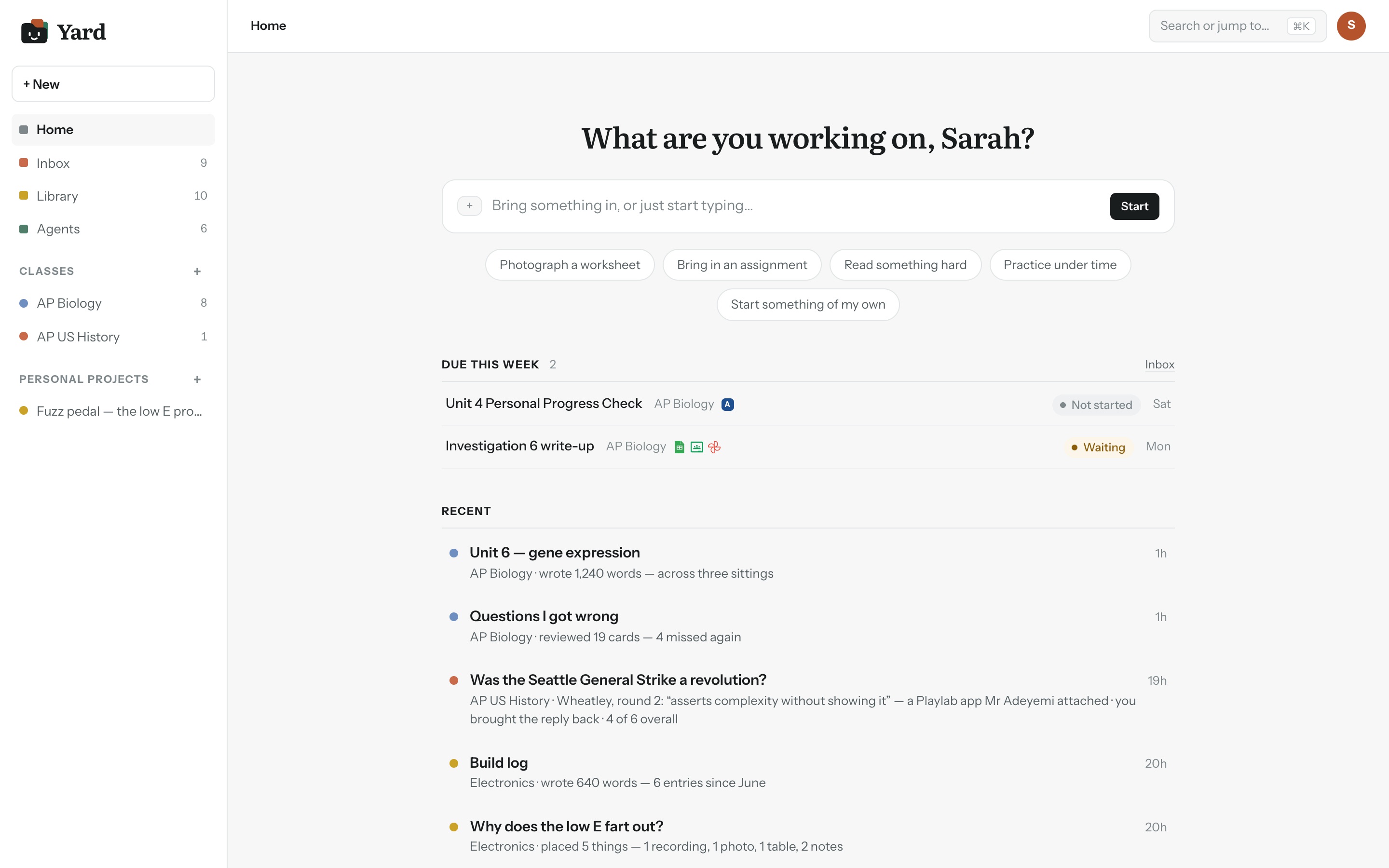
Yard's home screen: classes and personal projects in the sidebar, ways to start work, what's due this week and recent work.
Your school

And a classroom, wired to your school

Your assignments, your teachers’ comments and your grades land in one inbox. Add an assignment to a project and its handout, rubric and due date come with it.

When you hand in, it goes back to your class the same way.
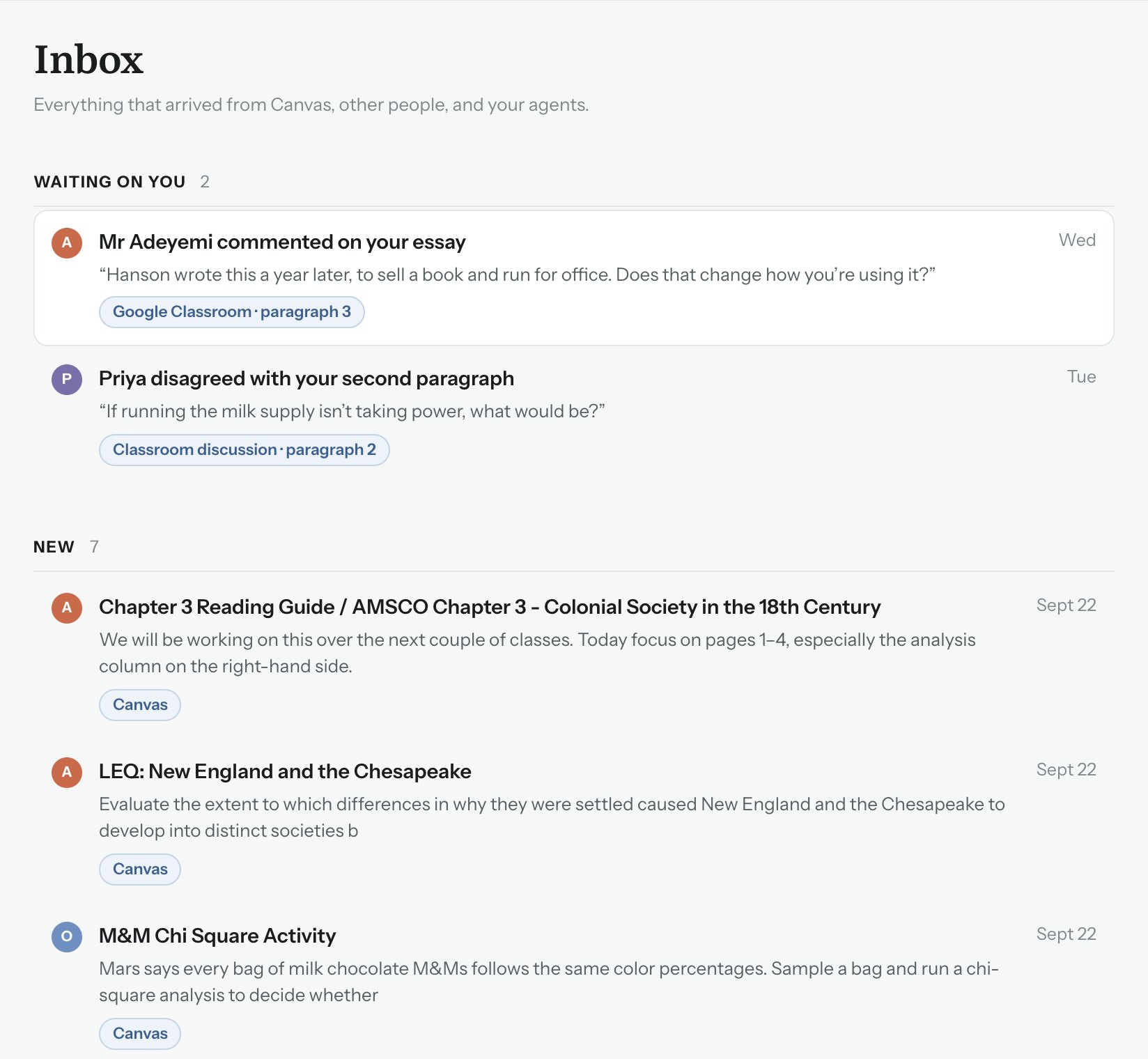
Yard's inbox: comments waiting on you and new assignments from Canvas.
An open comment from Mr Adeyemi, pinned to paragraph 3 of the essay, with Open it at paragraph 3 and Reply in Canvas.
What’s inside

Made for work that takes more than one sitting

Pick up where you left off

Every comment, feedback round and thread stays with the work, so next week starts where this one stopped.
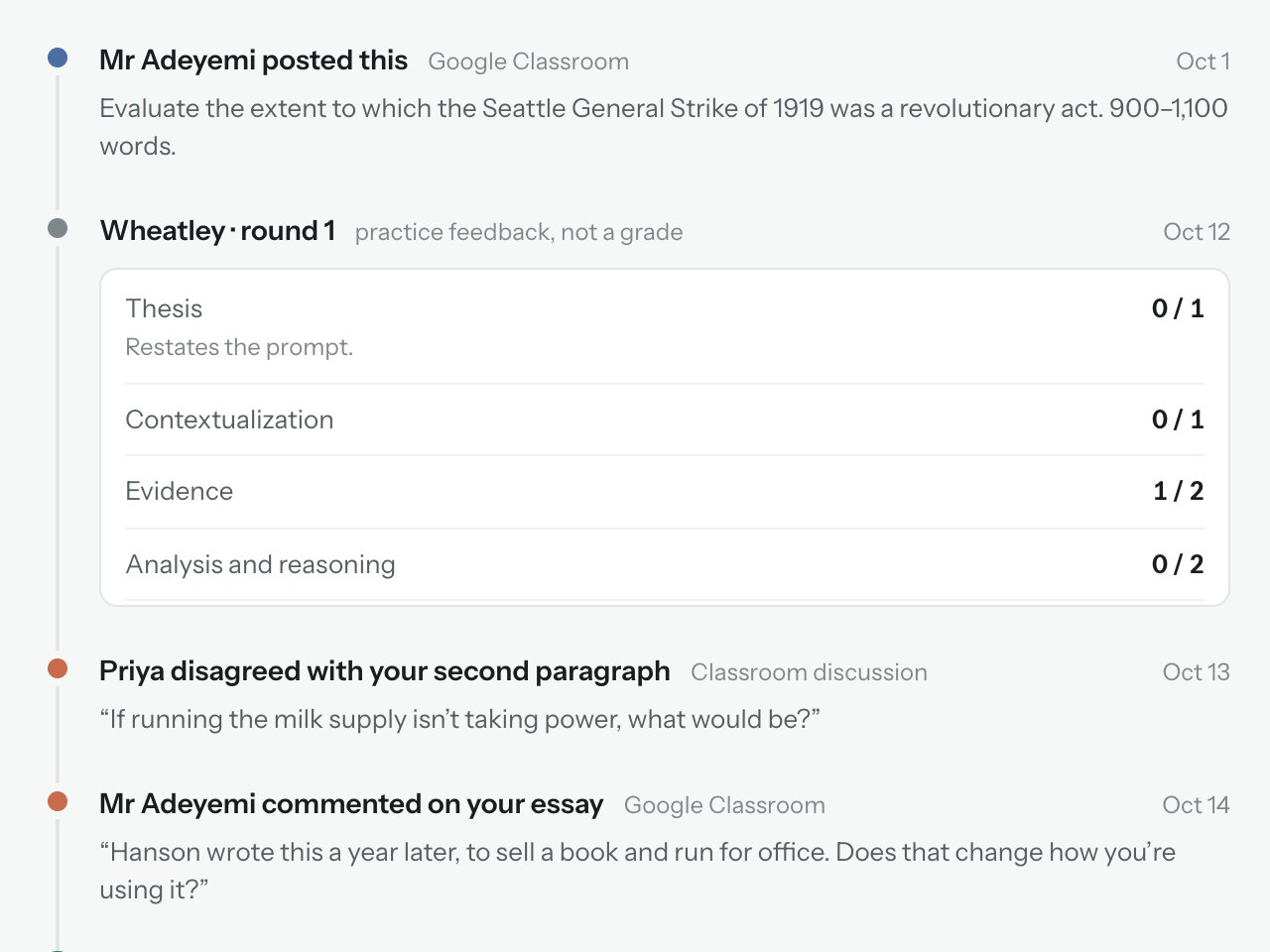
An essay page showing a week of activity: the assignment, a round of feedback, two comments, and a thread with Nib.

Keep the big goal in view

Put everything for one goal under one project, with the date it’s all for and what’s left to do.
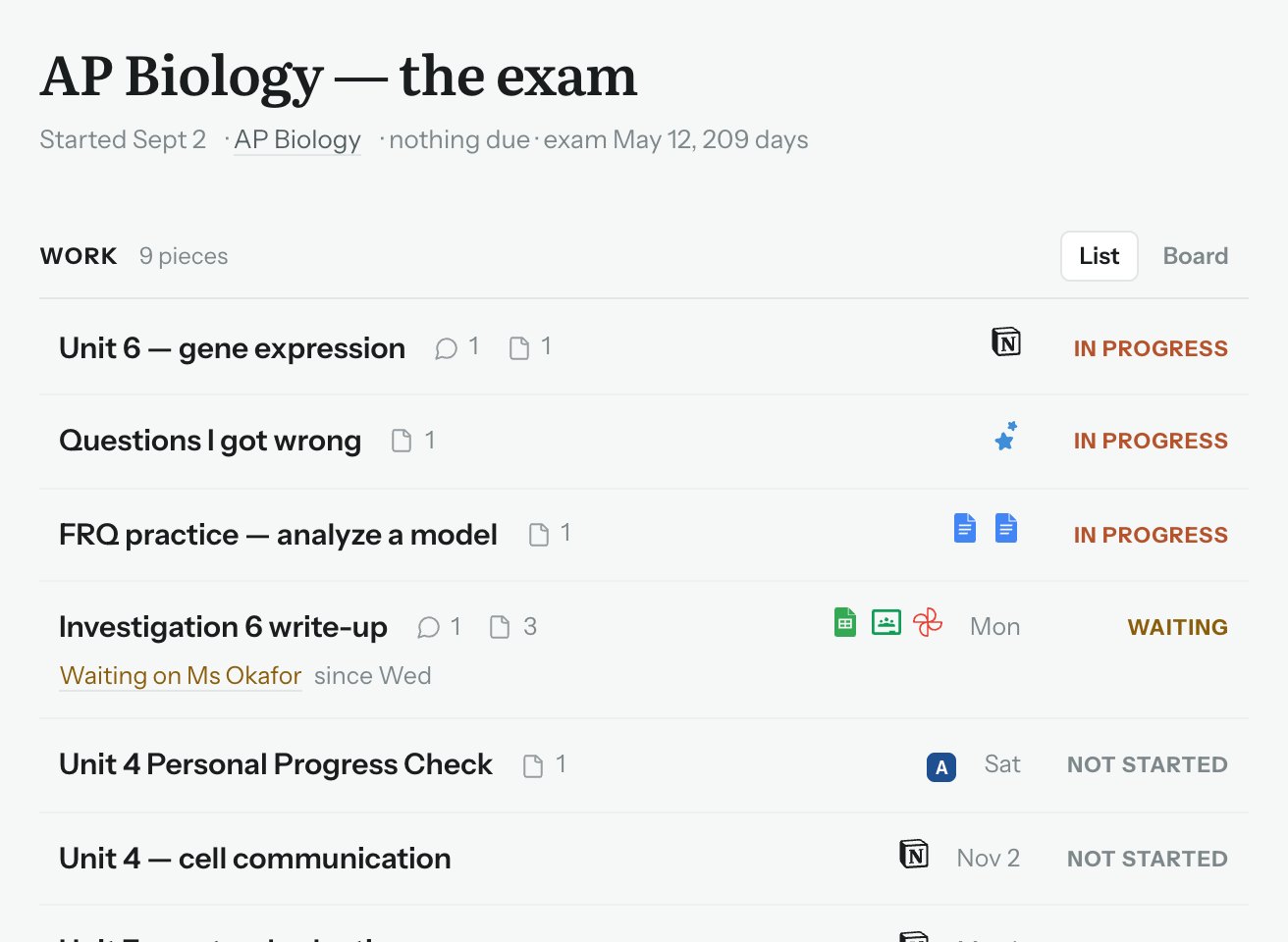
A project called AP Biology, the exam, listing nine pieces of work with their status and due dates.

Ask your teacher in context

Send a question from the step you’re stuck on. It stays pinned there, and the work shows it’s waiting until they answer.
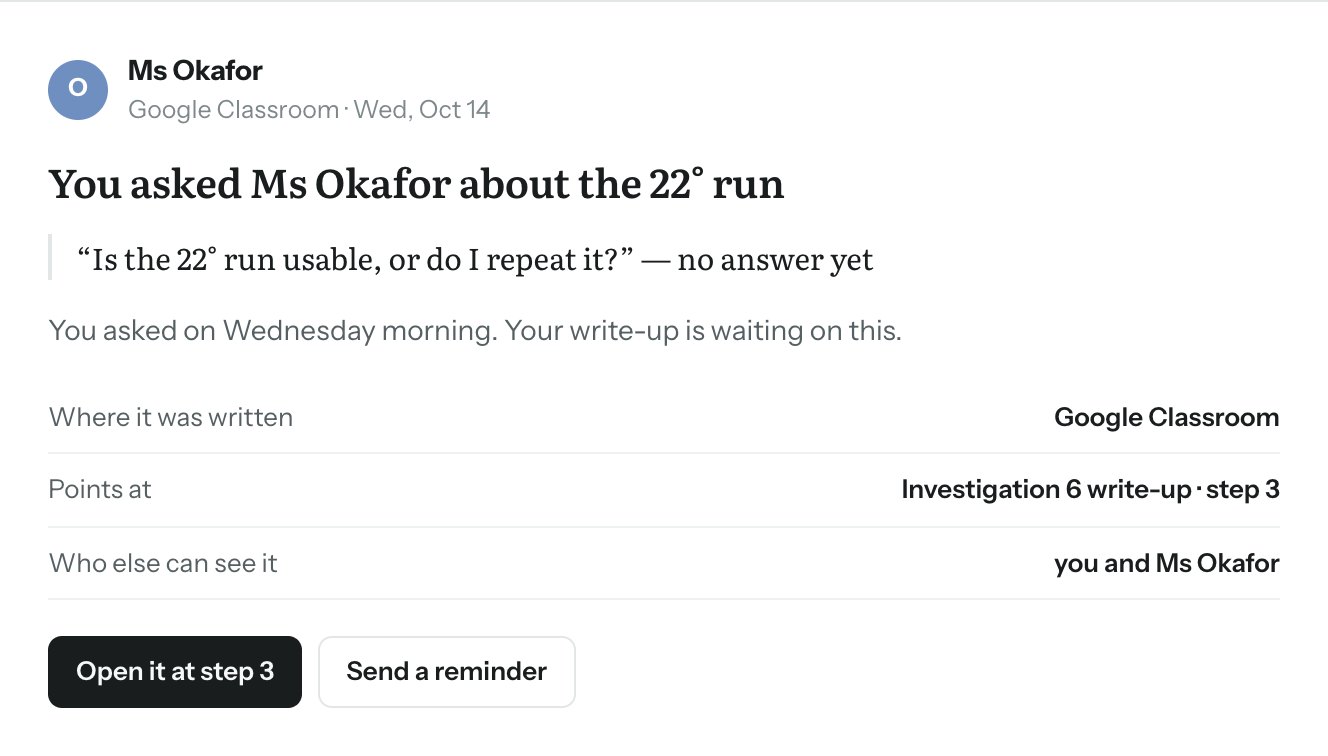
A question to Ms Okafor about one step of a lab, marked as waiting for her answer, with a button to send a reminder.

Study from your own notes

Tell Nib what the test covers and attach your notes. It writes timed questions from them, as many as you need.
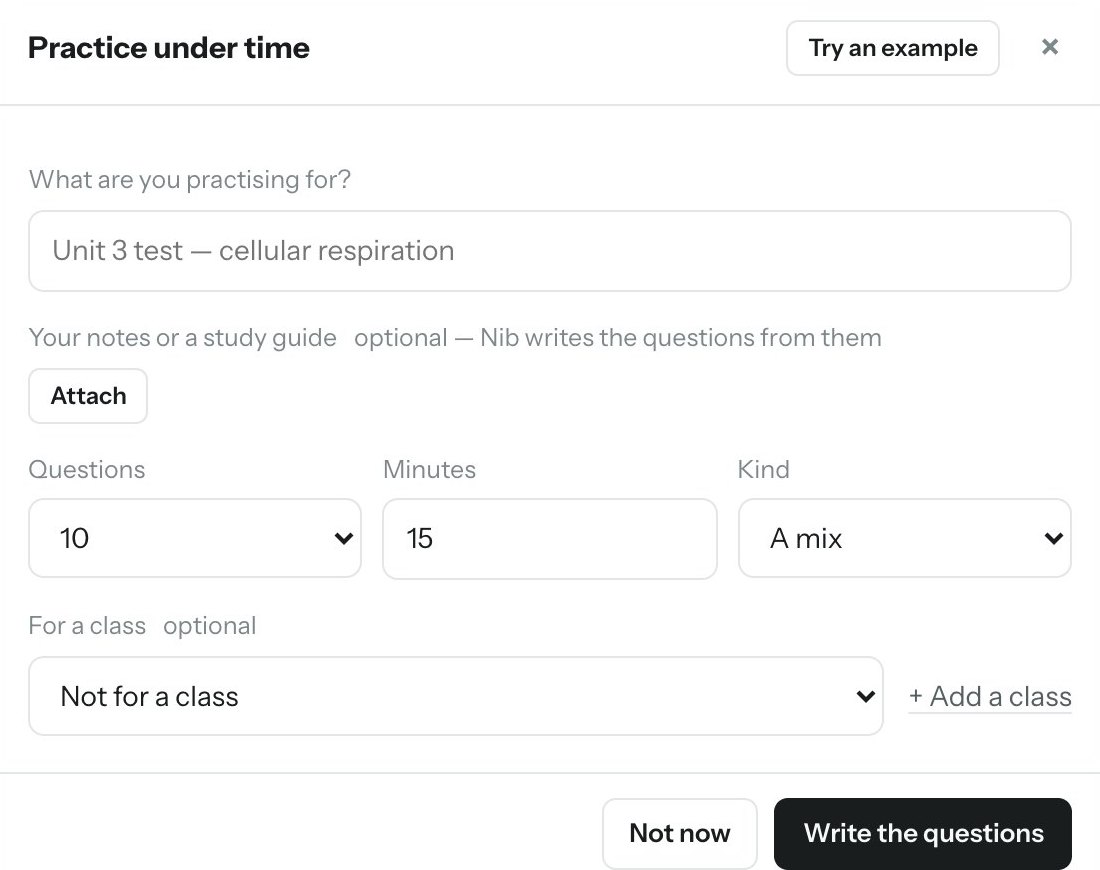
The Practice under time dialog: what you’re practising for, your notes, number of questions, minutes and question type.

Start with your next assignment

Yard is open to a few classes this term. Put your name down and we will come and find your school.

Join the waitlist
Questions

What students ask us

Is using Yard cheating?

Not when your teacher allows it, and Yard only does what they allow. Every assignment carries its permissions, and Nib stays inside them. If it can’t help with something, it tells you so.

Can my teacher see everything I do?

Your teacher sees work you hand in for their class, along with how it was made. Projects you start yourself are yours. No teacher can open them.

Where does my work live?

In your own Google Drive, Notion or FigJam. Yard connects the file you choose to the work it belongs to and keeps no copy of your writing.

Does it work with my school?

Yard connects to the learning platform your school already uses. We’re starting with a few schools this term. Join the waitlist and we’ll get in touch with yours.

×
Yard

Open Yard

Sign in with the Google account your school gave you, or look around a demo school first.

Sign in with Google
or
Try the demo

The demo runs on two made-up schools. Nothing you do there reaches a real class.

× ← Back

Who do you want to be?

Pick a student to work in Yard, or a teacher to see their school’s platform.

Try this: as Ms Okafor, set what Nib may do on the lab. Then open Yard as Sarah and try to get past it.

Yard for schools and platforms

Yard is a student work environment. It connects to the learning platform a school already runs, holds an AI assistant to the limit each assignment sets, and returns every submission with a record of how it was made. Staff run nothing new. Students keep their files where they are.

An AI policy the school can enforce

Most school AI policies are a paragraph in a syllabus. In Yard they are permissions. The school sets a default for assigned work, a teacher can change it on any assignment from the platform they already use, and the assistant follows it. A request outside the permissions is refused and logged, with who set them. The policy applies while the work is being done, not in an investigation afterwards.

Seven levels cover the lines schools already draw, from no AI to open use with everything cited. The four in the middle are Yard’s own, and students see them in the teacher’s words.

The teacher’s note, shown to the student word for word

Academic integrity with evidence behind it

Every submission arrives with a record: what the student asked, what the assistant did, what the student changed themselves, and what they declined. Entries are appended and never edited. Each is sealed to the one before it and the database refuses changes, so the record cannot be altered by the student, a teacher, or the school after the fact, and tampering is detectable.

The record holds actions, not content. One entry per work session, no keystrokes, no copy of the student’s writing. Where a syllabus requires students to cite AI use, the citation is generated from the record and attached to the submission.

Teachers see the record for graded work in their own class, after it is handed in. A student’s own projects are never visible to staff.

It fits the systems already in place

For a school, Yard sits between the learning platform and the tools students already write in. Assignments, attachments and due dates come in from the platform; submissions, records and citations go back to it. Teachers post and grade where they always have. Students work in Google Docs and Sheets, and Yard connects the one file an assignment needs.

For a platform, Yard connects through a small adapter: classes, assignments, attachments, submissions, grades. A platform that fills it gives its students an AI work environment without building one, and its own assignment permissions carry through to the assistant.

Student data stays with the student

The work itself never moves into Yard. Students write in their own Google Drive, Notion or FigJam, and Yard can open only the files a student connects to a piece of work.

What Yard keeps

  • The assignment as it arrived from the platform, with its permissions
  • The conversation between the student and Nib
  • The record: one entry per action, sealed so it cannot be altered
  • The submission and its AI-use statement

What it never keeps

  • A copy of the student’s writing or files
  • Keystrokes or screen activity
  • Anything from a student’s own projects that staff can open
  • Student data for model training: every request goes out with data collection denied

Nib runs on whichever model provider the school chooses, under the school’s own account. Yard is built for FERPA, and for COPPA’s school-consent route where a pilot includes students under 13. Setup is a platform connection over LTI 1.3 and a one-time approval by the school’s Google Workspace administrator.

Become a design partner

We are choosing a small number of schools and platforms to build Yard with this year. For a school, that starts with one class, one teacher and one term. For a platform, it starts with the adapter and one partner school.

The demo covers the whole loop, student and teacher side, in about ten minutes.

Become a design partnerSee the demo